
Al YouTube Tag Generator
Easily generate SEO-friendly YouTube tags using our free AI YouTube tags generator to increase views and get discovered faster in seconds.
How to Use the YouTube Tag Generator?
Generate SEO-ready YouTube tags in just a few steps. Our free AI tag generator for YouTube helps optimize video metadata, increase discoverability, and grow your channel faster.
Step 1. Enter Your Video Title
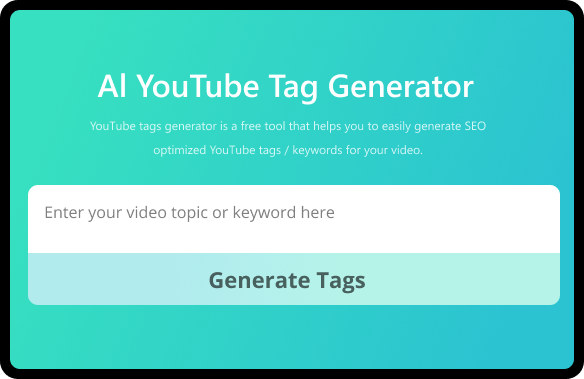
Enter your video title/topic or main keyword in the searchbar to start generating tags for your YouTube video.
Step 2. Generate Tags
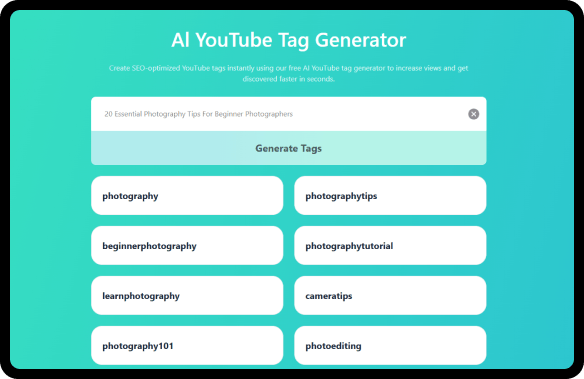
Hit "Generate Tags" to instantly create SEO-friendly tags based on your title or topic. Our AI YT tags generator analyzes your topic and delivers relevant tag suggestions.
Step 3. Copy the Generated Tags
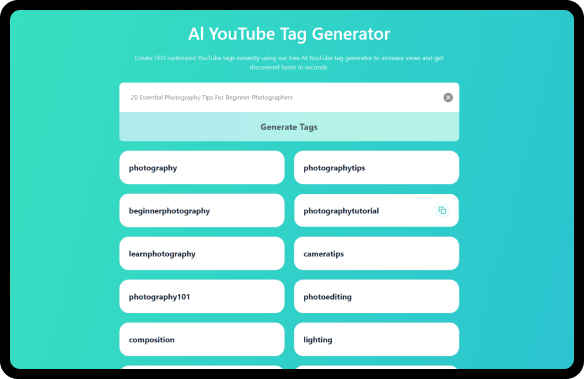
Preview your generated tags and copy the ones you need to your clipboard.
Step 4. Add Tags to YouTube Video
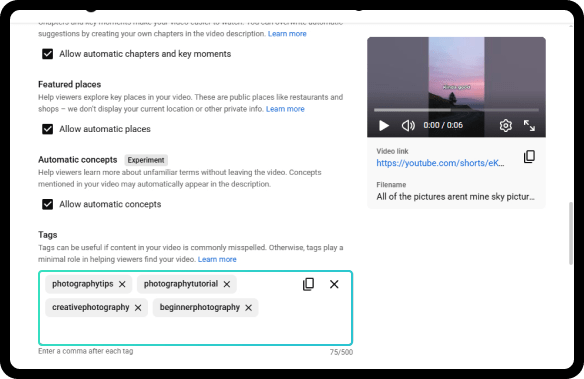
Paste the tags into the Tags field of your video details when uploading or editing. You’ll need to click "Show more" to access the tag section.
Boost YouTube Rankings with AI YouTube Tag Generator
-
Rank Higher in YouTube Search
SEO-ready tags help YouTube accurately identify your content. Rank higher in search results, appear in recommendations, and attract more organic views, all without paid ads. Make your content easier to find on YouTube.
-
Reach Viewers Ready to Watch
Generate high-performing tags powered by trends, real search data, and top niche videos. Our AI YouTube video tag generator brings your content to the right viewers, boosting reach, clicks, and meaningful views.
-
Get SEO Tags in Seconds
Skip the tedious task of optimizing video tags — just enter your topic and instantly get SEO-friendly tags from top videos. This intuitive AI tool makes tag creation simple and stress-free, so you can focus on creating content you love.
What Is YouTube Tag Generator?
YouTube Tag Generator is an AI-powered tool that helps you generate SEO-friendly tags from video topics or keywords. By creating relevant tags in seconds, the tag generator for YouTube improves video discoverability and helps your content reach the right audience.
Powered by advanced AI, the YT tag generator analyzes top-performing videos, competitor tags, and search trends to deliver high-impact tag suggestions tailored to your niche. Simply enter your topic and let the AI do the work.
Each tag set includes a smart mix of main topics, niche-specific keywords, and related search terms — giving your videos more opportunities to appear across different search intents. Whether you're a beginner or a growing creator, this tool helps you attract targeted traffic and grow your channel faster.
How to Choose the Best YouTube Tags?
To rank your videos and get more views, choosing the right tags matters. Here are a few proven tips to help you create effective YouTube tags:
1. Start by using our free YouTube tags generator to get relevant tag ideas based on your topic or keyword. Tags are automatically formatted for YouTube, so you can copy and paste them instantly. For better results, quickly review and adjust the tags if needed.
2. Place your primary keyword as the first tag, then add longer, more specific phrases. Long-tail keywords help smaller channels rank more easily and attract targeted viewers.
3. Don't forget to add your channel name or branded tags, this increases the chances of your new videos appearing as “Suggested” when viewers watch your existing content.
Bonus Tips: Use our AI YouTube tags generator tool to discover the tags used by top-performing videos in your niche. Avoid adding irrelevant tags just to fill the 500-character limit — quality always matters more than quantity.

3 Core Types of YouTube Tags
Each tag type plays a different role. When used together, they help YouTube understand your content, boost discoverability, and reach the right audience — not just more people.
-
Main Topic Tags
Primary keywords that describe what your video is about.
air fryer recipes best air fryer meals air fryer chicken tenders -
Long-Tail & Intent Tags
More specific phrases with clear viewer intent and less competition.
low calorie air fryer french fries 10 minute air fryer chicken tenders -
Channel & Category Tags
Format, niche, or branded terms that help group your content and boost recommendations.
air fryer cooking food shorts quick recipe series
Why Choose Our YouTube Video Tag Generator?
-
Free & No Sign-Up Required
Use our SEO YouTube tag generator instantly with no account, no hidden costs, and no tracking. Built for creators who value speed, simplicity, and privacy.
-
AI-Powered
Our AI analyzes context, trends, and YouTube algorithm signals to generate effective tags in seconds — no overthinking,no tracking, just smart, up-to-date results.
-
Support Multiple Languages
Our tag generator supports 30+ languages, helping creators generate accurate YouTube tags for international, multilingual, and non-English content with ease.
-
Unlimited Access
Generate unlimited custom YouTube tag ideas with fresh keyword variations every time. Easily explore new tag ideas and find the best fit for your video content.
-
User-Friendly
Made for creators who value speed. Find 10+ niche-related tags fast, review them at a glance, and copy YouTube tags that only what work for your video.
-
Extract Tags from YouTube URLs
Paste any YouTube video URL to instantly extract relevant tags and understand what works for competitors, so you can optimize your content more effectively.
Related AI YouTube Tools to Grow Your YouTube Channel
Discover a suite of powerful, free AI tools built to improve your content quality, expand your audience, and sharpen your YouTube strategy.
-
AI YouTube Title Generator
Create attention-grabbing, niche-optimized titles in seconds. Stop guessing what works — generates titles designed to improve click-through rates and search visibility.
-
YouTube Name Generator
Generate unique channel names tailored to your niche. Build a clear brand identity that helps viewers instantly understand and remember your channel.
-
YouTube Video Summarizer
Extract key ideas from any YouTube video in seconds. Ideal for competitor research, content planning, and finding inspiration without watching full videos.
FAQs About AI YouTube Tag Generator
-
How to add tags to YouTube video?
Adding tags to YouTube video is simple, but choosing the right ones makes all the difference.
1. Enter your video title, topic, or main keyword into our free YouTube tag generator to get a list of relevant, SEO-friendly tags.
2. Review the tag suggestions and copy YouTube tags that best match your video content.
3. Go to YouTube Studio → Video Details → Tags, then paste the copied tags into the tags field and save your changes.
This helps YouTube better understand your video and improves its chances of being discovered. -
How to tag YouTube videos for more views?
To tag YouTube videos for more views, simply enter your video topic into our AI YouTube tags generator. The tool instantly creates SEO-optimized tags based on search intent, relevance, and topic context at no cost. Using the right tags helps your video appear in search results and related video recommendations, making it easier to reach the right audience.
-
How do YouTube tags work?
YouTube tags are keywords that help YouTube understand your video’s topic, connect it with similar content, and show it in relevant search results. While less important than titles and descriptions, well-chosen tags still improve discoverability — especially for smaller channels. To generate YouTube tags effectively, it’s better to prioritize quality and relevance over quantity rather than guessing or stuffing keywords.
-
What are tags in YouTube videos?
YouTube tags are keywords or phrases that you attach to your video. They provide YouTube's algorithm with context and information about your video's content, subject matter, and relevancy to viewers. These tags play a critical role in how your video is discovered in YouTube's search and recommendations.
-
What are popular YouTube tags for views?
There are no universal tags that guarantee more views. Tags only work well when they are relevant to your video’s topic and audience. Instead of copying generic or trending tags, it’s more effective to generate tags based on your specific niche and content. You can easily do this using our free AI tag generator for YouTube.
-
How do I generate YouTube tags?
Simply enter your video topic into our free YouTube tag generator. Our AI analyzes your topic and instantly provides a list of relevant, SEO-friendly tags that you can copy and paste directly into your YouTube video.
-
What is the best way to add tags on YouTube?
The best way to add tags on YouTube is to use relevant, specific, and search-focused keywords, rather than stuffing random or overly broad tags. Our YT tags generator is widely regarded as an effective solution thanks to intelligent AI-powered tag suggestions. The best YouTube tags generator helps creators quickly generate tags that align with YouTube search behavior and content context.
-
How many tags should I use in YouTube Videos?
In most cases, using 5–8 relevant tags is enough. Adding too many tags or irrelevant keywords can confuse YouTube’s algorithm and reduce effectiveness. Prioritizing quality and relevance over quantity is key, and using a YouTube tag generator and optimizer can help you quickly identify the most relevant tags for each video.
Create Smarter Tags. Reach More Viewers.
Use the AI tags generator for YouTube to instantly generate optimized tags. Just type your video topic, copy the tags, and improve discoverability, reach the right audience, and grow your channel faster.
Generate YouTube Tags Now
Rate Us Now!
If you like our YouTube tag generator, please give us 5 stars
7556 reviews
Last updated: 2026-02-09