
AI and Accuracy: How to Translate YouTube Subtitles the Smart Way
William Davis | Updated on 2025-12-11
Sometimes, you've created knockout content, but are you relying on your local audience? That's old school. Learning how to translate YouTube subtitles is essential for serious expansion. Forget geographical limits! Here’s the deal: Every time you translate your YouTube captions, you’re feeding the search engine algorithms exactly what they want. It’s SEO gold. Translated YouTube subtitles mean your video ranks for keywords in Spanish, Mandarin, and Arabic. You leverage the power of AI transcription but refine it with human polish. Why box yourself in when you can use these tools to build a massive, global following?
Contents
Why Translating YouTube Subtitles Matters
Method 1: The YouTube Built-in AI Translation Tool
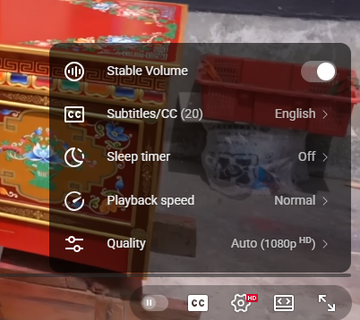
First up, the quick fix. YouTube’s internal system is powered by powerful AI. Head to the "Settings" gear, click "Subtitles/CC," and if the creator provided the original YouTube captions, you’ll see that sweet "Auto-translate" option. This is your immediate, machine-powered translation into dozens of languages. Need a fast summary of a complex foreign video? This AI translation capability is fantastic. It’s speedy, convenient, and shows just how far AI subtitles have come. It handles the bulk of the initial work for your YouTube video subtitles.
Using Auto-Translate for Quick Subtitle Translation
First up, the quick fix. YouTube’s internal system is powered by powerful AI. Head to the "Settings" gear, click "Subtitles/CC," and if the creator provided the original YouTube captions, you’ll see that sweet "Auto-translate" option. This is your immediate, machine-powered translation into dozens of languages. Need a fast summary of a complex foreign video? This AI translation capability is fantastic. It’s speedy, convenient, and shows just how far AI subtitles have come. It handles the bulk of the initial work for your YouTube video subtitles.
Limitations of Automatic YouTube Caption Translation
But here’s the crucial caveat: Even the smartest AI makes mistakes. Especially when dealing with nuances. Have you ever seen an AI-generated translation completely butcher an idiom or highly technical jargon? It happens all the time! Relying solely on that automated translation for your own official channel content is risky. If you want professional, accurate delivery, you can’t trust the AI blindly. The quality of your translated YouTube subtitles reflects directly on your professionalism. We need to go beyond basic AI output to achieve true accuracy.
Method 2: Leveraging External Tools for Accuracy
Downloading YouTube Subtitles: The First Step
To beat the basic AI limitations, you need control. That means extracting the original text. You'll use a third-party tool to download the source YouTube subtitles (usually as an SRT file). Why is this critical? Because once you have that file, you can employ more sophisticated translation tools, leverage superior AI translation models, or—best of all—hire a native human reviewer. The initial step is always separating the text from the video. This raw SRT file allows you to feed the transcription into a more powerful, contextual AI translator than YouTube's built-in option.
The Role of Video Converters
Now, let's talk about optimizing the delivery of your perfectly translated content. You’ve refined your YouTube captions to be flawless, but what about the video itself? If your file is too big or in the wrong format, the entire effort stalls.
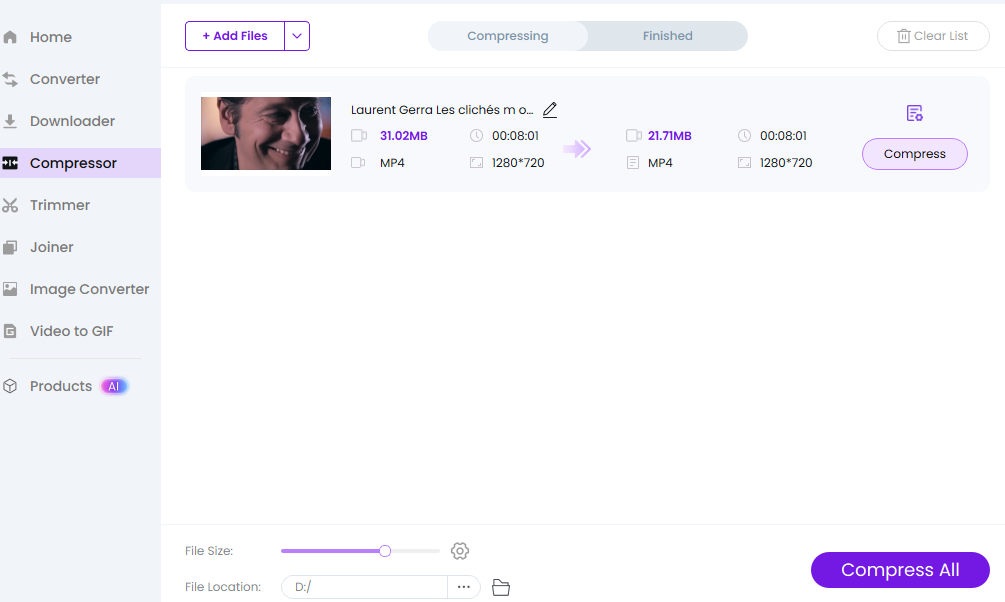
This is where essential tools like BeeConverter come in. Think of it as the mission control for your file mechanics. After you’ve done the hard work of getting high-quality, translated YouTube subtitles, you might need to use BeeConverter's compression feature to drastically shrink a huge video file size for faster uploads. Or maybe you need to convert a complex format for different platforms. BeeConverter ensures your video file is streamlined, optimized, and ready to upload quickly alongside your new global subtitles. It smooths out the workflow after the initial AI transcription and translation stages are complete.
Pro Tip: Quality Control and Finalizing Your Translated Subtitles
Reviewing and Editing the Translated YouTube Captions
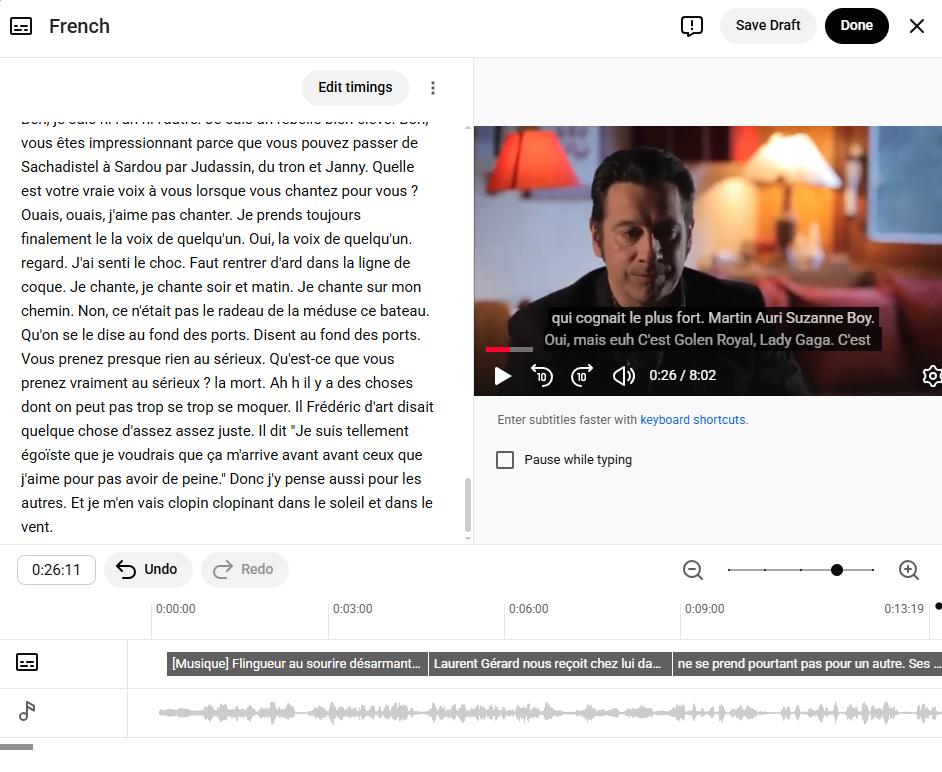
You have the translated SRT file, likely generated by an AI translation tool. Your next move? Proofreading, proofreading, proofreading. Remember, AI is a starting point, not the finish line. You need human editorial input to catch cultural mistakes, grammatical errors, and ensure the tone is spot on. Good translated YouTube subtitles should sound like they were written by a native speaker, not a highly effective robot. Spend the time correcting those AI subtitles. This is how you differentiate your premium content.
Re-uploading the Accurate Subtitles to Your Video
Time for the big finish! Upload your human-verified subtitle file in the YouTube Studio. Label the language clearly. By combining the speed of AI transcription with the accuracy of human editing, and then uploading those polished YouTube subtitles, you're maximizing your global impact. You’ve leveraged technology intelligently. You are now a truly smart global creator.
Conclusion
Mastering the process of how to translate YouTube subtitles means strategically using AI as a powerful assistant, not as a replacement for human judgment. Don't settle for the basic auto-translate. Adopt a superior workflow: download the source file, refine the AI-generated translation, use tools like BeeConverter for optimal file preparation, and finalize the quality of your subtitles with human eyes. Your global audience deserves the best version of your message, and now you know how to deliver it.