
How to Clip a YouTube Video with AI for Instant Viral Hits
William Davis | Updated on 2025-12-11
You’ve poured hours into creating your long YouTube videos—the detailed tutorials, the deep-dive interviews, the comprehensive guides. But here’s the harsh truth: most people don't have an hour to spare. You need to pull out the best bits, the jaw-dropping moments, and the key takeaways. This isn't just about cutting clips; it’s about mastering how to clip a YouTube video with AI to create instant, magnetic short-form content. Think of it as mining pure gold from your lengthy content stream. If you want to dominate short-form platforms, you must stop letting your viral potential hide in 60-minute files.
Contents
Why Traditional Video Clipping is a Total Time Sink
Let's talk about the old way. Picture this: You are manually scrubbing through footage, eyes glazing over, hunting for that single, perfect soundbite. You hit pause, write down the timestamp, then start again. It’s boring. It’s repetitive. Most importantly, it's a huge waste of your valuable time. This traditional approach to video clipping doesn't scale. If you are aiming for consistent, daily content, dedicating hours to tedious manual edits just isn't sustainable. Are you a creator or a human VCR? You need a faster, smarter way to transform your long-form videos into powerful short clips.
The AI Revolution: Clipping YouTube Videos Made Easy
Enter Artificial Intelligence. This is where the game changes. AI isn't just a gimmick; it’s a sophisticated engine that analyzes your video content for maximum impact. It scans audio transcripts, watches for visual cues like gestures or fast-paced action, and uses engagement data to pinpoint precisely where the conversation or tutorial peaked. Learning how to clip a YouTube video with AI means you get an expert editor working for you 24/7. It’s the ultimate shortcut to turning one video into dozens of pieces of captivating, ready-to-post content.
What Makes AI the Ultimate Clipping Tool?
AI leverages pattern recognition honed by analyzing millions of viral videos. It understands the rhythm of effective short-form content. Unlike your manual attempts, AI identifies subtle but crucial indicators—a sudden voice inflection, an important statistic reveal, or a moment of high tension. When you use this technology for YouTube video clipping, you’re not just randomly cutting; you’re generating clips that are statistically more likely to perform well. Why rely on intuition when you can tap into data-driven precision?
How AI Identifies the Best Moments
It might feel like futuristic magic, but it’s actually smart engineering. The AI uses natural language processing (NLP) to understand the meaning of the dialogue, not just the words. It can detect rhetorical questions, powerful conclusions, or sudden topic shifts. Visually, it tracks faces and movements to ensure the clip has dynamic energy. This intelligent, integrated approach guarantees that when you ask how to clip a YouTube video with AI, the answer involves getting the most compelling, contextual segment every time.
Your Go-To AI Powerhouse: BeeConverter Steps Up
So, which tool should you rely on for this powerful transformation? Let's talk about BeeConverter. Look, getting the perfect clip is only half the battle. You need a tool that handles the whole journey. This software isn't just about video clipping; it’s a comprehensive creative arsenal that speeds up your entire publishing workflow.
Clip, Convert, and Compress: Why BeeConverter is the Triple Threat
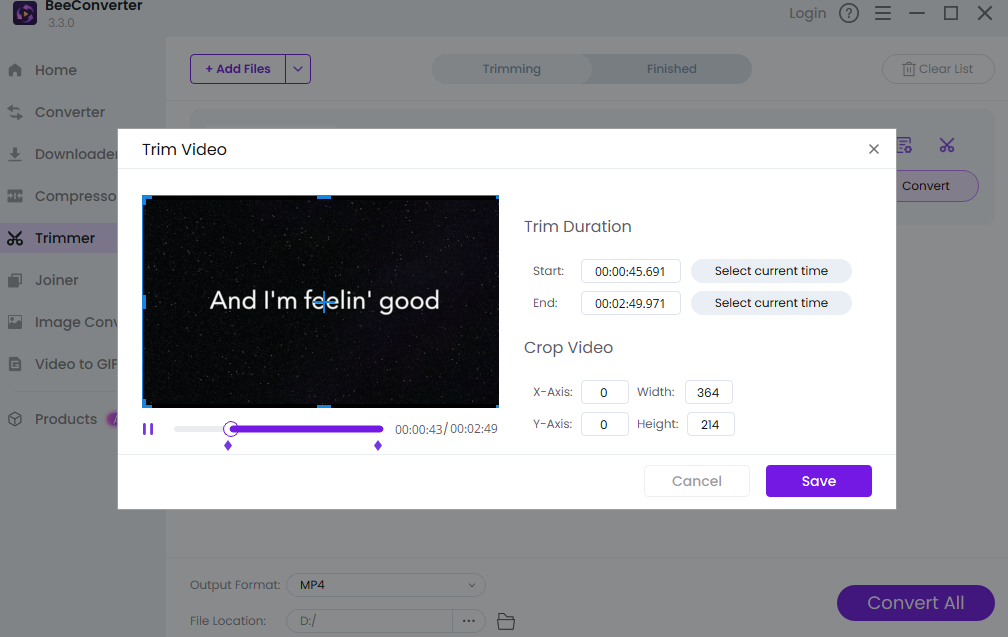
Imagine you’ve just used the AI features to snag a brilliant 45-second clip. Fantastic! But wait, your platform requires a specific file format, or the file size is too big for quick mobile uploads. That’s where BeeConverter saves the day. It’s the ultimate video format conversion utility, ensuring your clip exports perfectly to MP4, MOV, or whatever you need. Plus, its robust compression function shrinks the file size without sacrificing that crisp quality. BeeConverter turns the tedious technicalities of how to clip a YouTube video with AI into a smooth, three-step process: find the clip, convert the format, and compress the file. Simple, effective, and fast.
Beyond the Clip: Maximizing Your Content with AI
Don't just upload the clip and walk away. Clipping is a strategic move for content repurposing.
Repurpose Like a Pro: Short-Form Content Strategy
Every single long video you make should generate at least five high-quality short clips. This strategy ensures you are constantly feeding the social media beast across all major platforms—Shorts, Reels, and TikTok. By consistently learning how to clip a YouTube video with AI, you multiply your presence. Each short clip acts as an organic, powerful advertisement, driving traffic and new subscribers back to your main YouTube channel. This is how high-growth creators build audiences today.
The Future is Now: AI Tools You Can’t Ignore
This isn't a temporary trend. AI in video production is the standard now. Future tools will only become smarter, identifying niche content hooks and optimizing clips for specific demographics. If you wait to adopt intelligent solutions for video clipping, you risk falling behind competitors who are already reaping the rewards of instant content generation. Are you going to be the creator
Conclusion: Ready to Level Up Your Content Game?
You no longer need to spend agonizing hours hunting for the perfect clip. Leveraging AI to handle your YouTube video clipping is a requirement for modern, successful content creation. Tools that combine AI clipping with essential features like conversion and compression—like BeeConverter—are your secret weapons. Stop wasting time on repetitive tasks and start focusing on scaling your influence. Go ahead, deploy the power of AI, and watch your content reach new heights.