
Lecture Transcription Generator
Convert academic lectures into searchable text instantly in 100+ languages with powerful AI.
- 99% positive user reviews
- Ultra-high recognition accuracy
- Supports 100+ languages
- Privacy and Security
How to Use Lecture Transcription Generator?
-
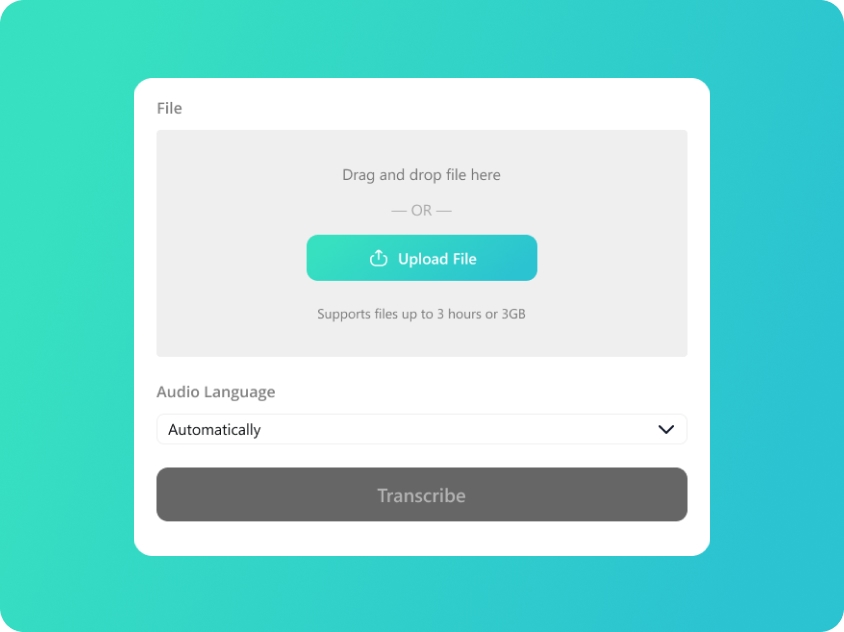
Upload Your Speech Audio
Upload or drag and drop your speech files; we support audio in MP3/WAV/M4A/AAC.
-
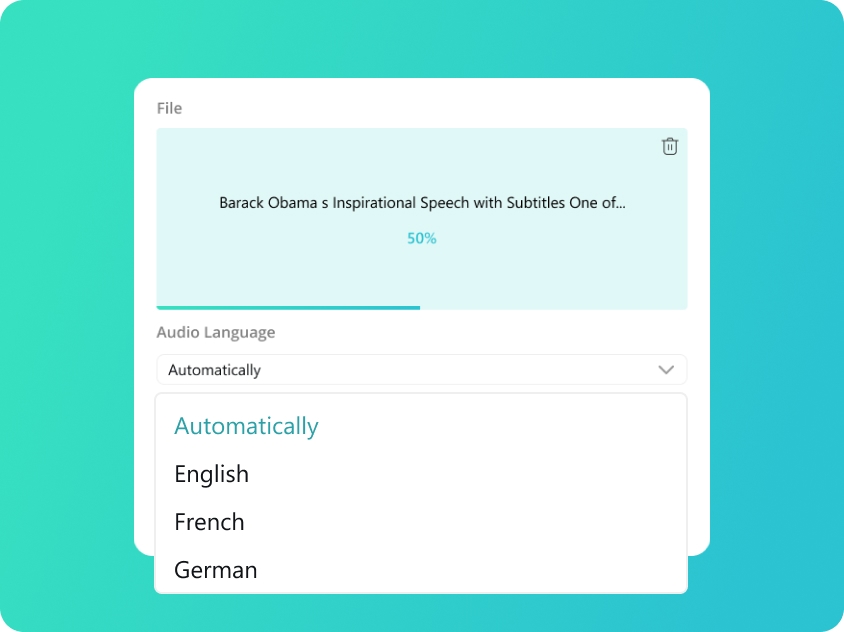
Select Lecture Language
We will automatically detect your audio language. You can also manually select from 100 supported languages for better accuracy.
-
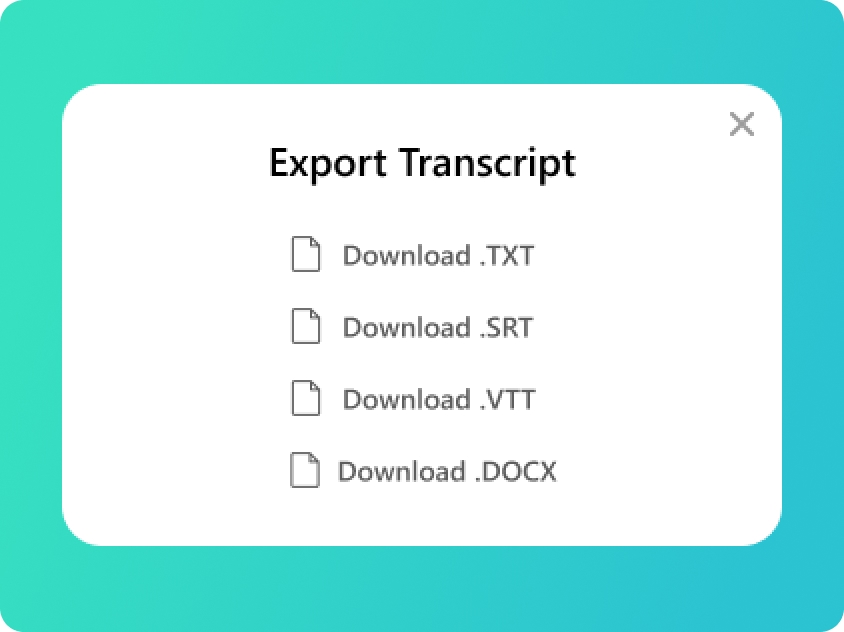
Transcript Audio to Text
You will get your transcript in minutes. Check the text and export as TXT,SRT,VTT or DOCX as you need.
Upload Your Speech Audio
Upload or drag and drop your speech files; we support audio in MP3/WAV/M4A/AAC.
Select Lecture Language
We will automatically detect your audio language. You can also manually select from 100 supported languages for better accuracy.
Transcript Audio to Text
You will get your transcript in minutes. Check the text and export as TXT,SRT,VTT or DOCX as you need.
Maximize Your Learning with Lecture Transcription
-
High-Accuracy for Academic Terminology
Can't keep up with professor's quick words? Our lecture transcription AI captures every fleeting point, ensuring you never have gaps in your notes that could cost you on the exam.
-
Effortless Note-Taking with AI
Raw audio is useless for last-minute cramming. Our audio transcriber turns messy recordings into organized text, giving you a solid foundation to for high-quality study guides.
-
Searchable Lecture Transcription
Don't waste hours re-listening to a 2-hour recording just for one definition. Use our audio to text converter to create a searchable script, and find any keyword instantly and jump straight to the answer.
-
Smart Audio Transcriber for Large Halls
Whether it's a heavy regional accent or a booming, echoey lecture hall, our AI filters the noise. Get a clean speech to text result even when the audio quality is a nightmare for human ears.
-
Multilingual Support for International Students
Studying with a different language is exhausting. Our speech to text tool acts as your personal note taking assistant, providing a written script to help you verify technical terms and complex concepts you might have misheard.
-
Versatile Export for Study Guides
Create your own study materials instantly. Use the audio to text converter to export transcripts into DOCX or PDF, perfect for building organized, searchable study guides and research archives.
Diverse Academic Applications for Lecture Transcription
- University Lectures
- Academic Seminars
- Dissertation & Thesis Prep
- Group Study



Manual Transcribe vs. AI Lecture Transcription
Manual Note-taking
Manual Note-taking
Requires extra hours to organize and fill in missing gaps after class.
High Risk
Key points vanish the moment a professor speaks too fast or you lose focus.
Exhausting
Sifting through messy, handwritten scribbles leads to burnout and frustration.
Extremely Difficult
Nearly impossible to listen, translate, and take notes in a second language.
Inefficient
Waste time dragging the seek bar back and forth to find a specific quote.
AI Lecture Transcription
Instant
Get a full lecture transcript immediately after class; start reviewing right away.
Zero Gaps
Captures every single word, ensuring a 100% comprehensive record of the lecture.
Total Control
Easily search keywords; stay organized and stress-free during finals week.
The Perfect Assist
Read along with the audio to bridge language gaps and master complex terms.
Pixel-Perfect
Click text to jump to the exact audio moment; one-click copy and paste for papers.
Frequently Asked Questions About Lecture Transcription
-
What is lecture transcription and how does it help me study?
Lecture transcription is the AI-driven process of converting classroom audio into organized text. Our audio to text converter acts as a powerful study aid, turning hours of spoken information into searchable notes, allowing you to focus on comprehension during class rather than manual writing.
-
How do I turn my audio lectures to text for citations?
Simply upload your recording to our lecture transcription generator. Once the transcript is ready, use the millisecond-level timestamps to find the exact quote you need. You can then export the text as a DOCX or PDF for easy copy-pasting into your research bibliography.
-
Is using a transcription tool consistent with academic integrity?
Absolutely. Our lecture transcription generator is designed as a personal study aid to enhance learning accessibility. We encourage students to use the generated transcripts to create their own summaries and study guides. However, please ensure you have the professor's permission to record the lecture and always adhere to your institution's specific policies regarding AI tools.
-
Can the AI recognize heavy accents from professors?
Yes! Our audio transcriber is trained in diverse global accents. Even if your professor has a strong regional accent or the lecture hall has background echoes, our AI filters the audio to ensure maximum speech to text accuracy.
-
Is my class data and recording kept private?
Your privacy is non-negotiable. All uploaded academic files are encrypted and processed solely by AI. We do not share your lecture content with third parties, and you can permanently delete your data from our servers at any time after your revision is complete.
-
What is the best free audio to text converter?
There is no doubt that we are the best free audio to text converter. Our audio transcriber has the ability to handle 100+ languages and export results into professional formats like SRT, VTT, and DOCX. Since it is entirely browser-based and free from hidden fees, it offers the most convenient and cost-effective solution for students, journalists, and professionals alike.
-
Does the tool support live audio to text?
Currently, our tool focuses on providing high-precision transcription for record to text rather than live, real-time input. To get the best results, simply record your audio first using your phone or computer, and then upload the file to our platform. Our transcript generator ensures much higher accuracy, as our AI can perform a deeper analysis of the entire recording to deliver a more polished and error-free transcript.
Rate Us Now!
Show your love by giving 5 stars!
Don't forget to share the free online transcription tool with your friends!
1.1K reviews
Last updated: 2026-02-10