
Al YouTube Title Generator
Generate click-worthy, SEO-optimized YouTube titles in seconds to boost views, increase CTR, and grow your channel with AI.
How to Generate YouTube Video Title Ideas?
Our AI YouTube title generator helps you create engaging titles for vlogs, tutorials, product reviews, gaming videos, reaction content, and YouTube Shorts in seconds.
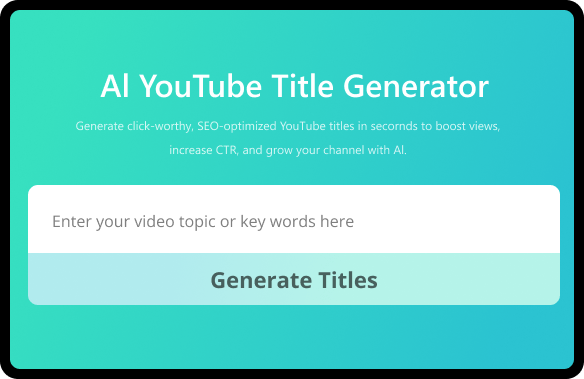
Step 1. Enter a Topic or Keywords
Enter your topic or keywords related to your video to generate accurate title ideas. It can be a description of a scene, the name of a character or person in the video, or a setting. Be sure to give the AI enough information to generate accurate titles.
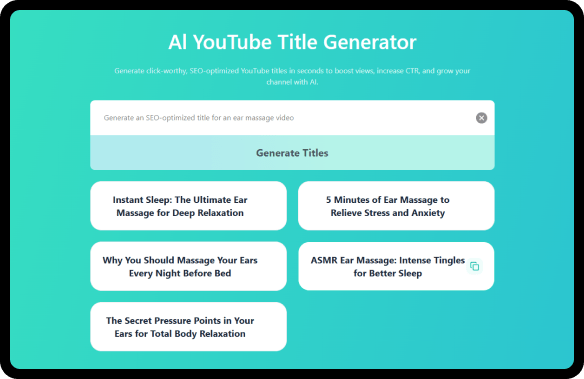
Step 2. Generate and Copy the Title
Click "Generate Titles" and instantly get a set of YouTube titles for your video. Preview the results and copy the ones you need to your clipboard.
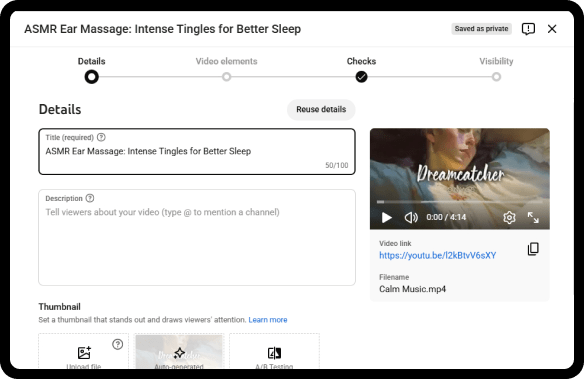
Step 3. Title Your YouTube Video
Paste the title into the title field of your video details when uploading or editing.
Create Click-Worthy Titles to Grow Your YouTube Channel
-
Increase Your Video’s Search Reach
Generate SEO-optimized titles built around the right keywords so your videos appear in search results, reach your target audience, and attract more views from users actively searching for content like yours.
-
Boost Click-Through Rate Instantly
Create attention-grabbing, curiosity-driven titles that stand out in crowded feeds, spark viewers’ interest, and encourage clicks, helping your videos get noticed without relying on clickbait or misleading tactics.
-
Save Time and Create Faster
Stop staring at a blank screen and wasting time brainstorming. Get multiple high-performing title ideas in seconds with our AI YouTube title generator, so you can focus on producing content that grows your channel.
What is YouTube Video Title Generator?
A YouTube title generator is an AI-powered tool that helps you instantly create engaging, click-worthy, and SEO-optimized titles for your videos. By analyzing your video topic and keywords, the title generator for YouTube suggests titles that stand out in search results, attract more views, and drive more clicks, likes, and subscribers.
Just enter your video topic or keywords, and our AI YouTube title generator will instantly deliver creative, highly relevant title ideas that capture attention and optimize your videos for search. This makes the title creation process fast, easy, and effective, even if you’re struggling to come up with the perfect title yourself.
How to Choose the Best Titles for YouTube Videos?
Choosing the right title is key to ranking your videos and getting more views. Here are four proven tips to create effective YouTube titles:
1. Include your main keyword: Place your primary keyword near the beginning of your title to improve discoverability and SEO performance.
2. Add a power word: Words like “Ultimate,” “Proven,” “Essential,” or “Shocking” make your title more attention-grabbing and clickable.
3. Keep your title short, ideally 5–7 words or under 70 characters, and capitalize important words. Clear, well-formatted titles perform better on both desktop and mobile.
4. Avoid clickbait: Be honest about what your video delivers. Misleading titles may get clicks once, but they hurt your channel’s credibility and long-term growth.
Bonus Tips: Use our AI YouTube title generator to instantly create multiple SEO-friendly title options. Review and tweak them quickly to find the perfect balance of findability and clickability.
What Makes Our YouTube Video Title Generator Different?
-
SEO & Clickability Optimized
Each title is carefully crafted to rank higher in YouTube search results while also encouraging clicks, helping your videos reach more viewers and grow your channel.
-
AI-Driven
Our AI analyzes keywords, trending topics, and YouTube search behavior to generate smart, up-to-date titles that resonate with your audience and improve video performance.
-
Unlimited Title Ideas
Generate unlimited, unique title options for every video topic, explore multiple keyword variations, and experiment with different styles to find the most engaging titles.
-
User-Friendly & Fast
Instantly create multiple niche-specific title options, review them easily at a glance, and copy the best-performing ones without any hassle, saving you time and effort.
-
Creativity & Inspiration Boost
Discover fresh angles and highly creative title ideas you might not have thought of, helping your videos truly stand out in a crowded niche and attract more viewer attention and clicks.
-
Free & No Sign-Up Required
Start generating high-performing YouTube titles immediately with no account, no hidden fees, and no tracking, designed for creators who value speed, simplicity, and privacy.
Related AI YouTube Tools to Grow Your YouTube Channel
Unlock a collection of free AI tools designed to spark new video ideas, generate compelling titles, uncover trending topics, and inspire content that keeps your channel ahead.
-
AI YouTube Tag Generator
Complement your video titles with high-ranking, niche-specific tags. Boost SEO and help YouTube understand and promote your content to the right audience faster.
-
YouTube Name Generator
Create a unique, memorable channel name that matches your niche and video topics. A strong brand identity makes your videos and titles more recognizable to viewers.
-
YouTube Video Summarize
Quickly extract key ideas and insights from any video. Perfect for planning your content, finding inspiration for new titles, and researching competitors without having to watch full videos.
FAQs About AI YouTube Title Generator
-
How to title YouTube videos?
1. Enter your topic or keywords in our YouTube title generator to instantly receive multiple SEO-optimized, click-worthy title ideas tailored to your content.
2. Choose a clear, keyword-focused title that improves search visibility and attracts more viewers. -
How to make a good YouTube title?
A good YouTube title should clearly describe your video, include searchable keywords, and stay under 60 characters to display properly in search results. It needs to spark curiosity without misleading viewers. With our AI YouTube title generator, you can instantly create optimized titles and test different variations to find the best-performing option in seconds.
-
What is the best title generator for YouTube?
The best YouTube title generator leverages advanced AI to understand your topic, identify trending keywords, and create compelling titles that match search intent. It should offer multiple options instantly, eliminating hours of brainstorming. Our AI YouTube video title generator does exactly that, delivering relevant, SEO-focused titles tailored to your content.
-
How to title YouTube Shorts?
YouTube Shorts titles should be short, direct, and attention-grabbing. Focus on one strong keyword and a clear benefit or hook. You can use our YouTube video title generator to quickly create punchy, high-impact titles that work well for Shorts and long-form videos alike.
-
Are YouTube title generators free?
Many YouTube title makers offer limited access, but YTBdownload title generator for YouTube is completely free with no account required. You can generate unlimited title ideas anytime and experiment with different angles until you find the perfect fit.
-
How to make a viral short title?
Viral titles usually combine strong keywords, emotional triggers, and curiosity. They are clear, concise, and promise value. Instead of guessing, use our AI YouTube title generator to create multiple viral-style title ideas and choose the one that best fits your content.
-
How to SEO a YouTube title?
To optimize a YouTube title for SEO, place your primary keyword near the beginning, keep it readable, and avoid keyword stuffing. The goal is to rank in search while still encouraging clicks. Our YouTube SEO title generator automatically creates keyword-optimized titles that balance SEO and engagement.
-
Do YouTube Shorts need a title?
Yes. Even though Shorts are short-form videos, titles still help YouTube understand your content and improve discoverability. A clear, keyword-rich title increases your chances of appearing in search and suggestions. You can quickly generate effective YouTube Shorts titles using our YouTube Shorts title generator.
-
How does the YouTube title generator work?
1. Enter your YouTube video topic or keywords in our free YouTube title generator.
2. Click "Generate Titles". In seconds, you’ll receive multiple AI-generated title suggestions tailored to your content.
3. Review and choose the titles that fit your video best and copy them instantly. -
How many characters in a YouTube title?
YouTube allows up to 100 characters, but titles under 60 characters usually display fully in search results. Shorter titles also perform better on mobile devices. Our AI title generator for YouTube automatically creates titles optimized for ideal length and visibility.
Create Catchy Titles. Get More Views.
Use the AI YouTube title generator to instantly create SEO-friendly, clickable titles. Just enter your video topic or keywords, pick the best options, and boost discoverability, attract more viewers, and grow your channel faster.
Generate YouTube Title Now
Rate Us Now!
If you like our YouTube title generator, please give us 5 stars
8357 reviews
Last updated: 2026-02-12