
Free M4A to TXT Converter
Transform your audio from M4A to TXT file online with high accuracy
- 99% positive user reviews
- Ultra-high recognition accuracy
- Supports 100+ languages
- Privacy and Security
How to Convert M4A to TXT Online?
-
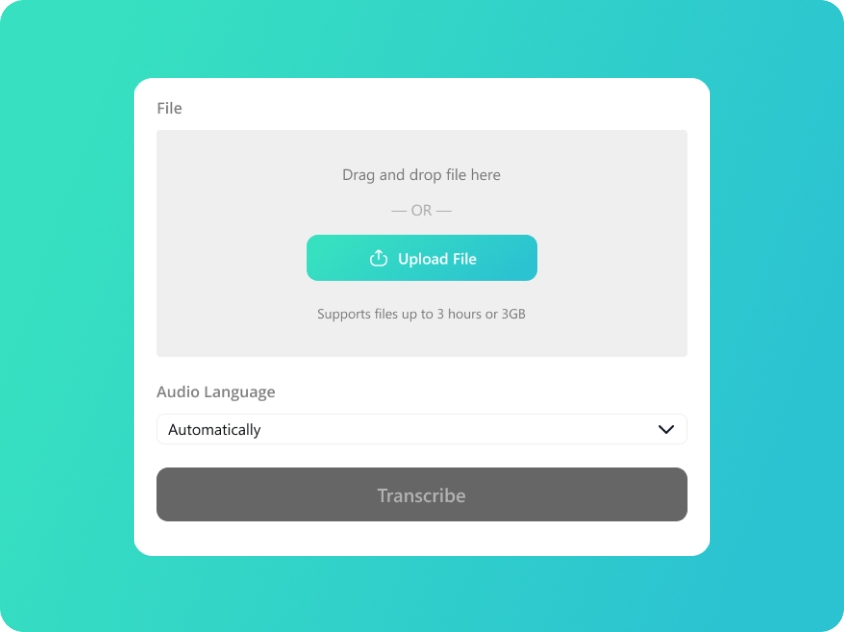
Upload Your M4A
Upload or drag and drop your M4A files; we also support audio in MP3/WAV/AAC format.
-
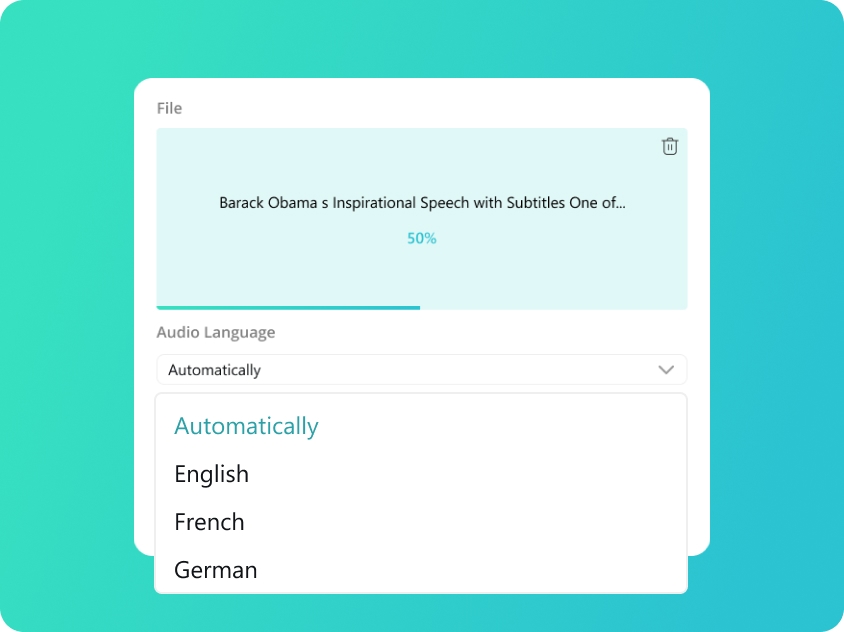
Select Audio Language
We will automatically detect your audio language. You can also manually select from 100 supported languages for better accuracy.
-
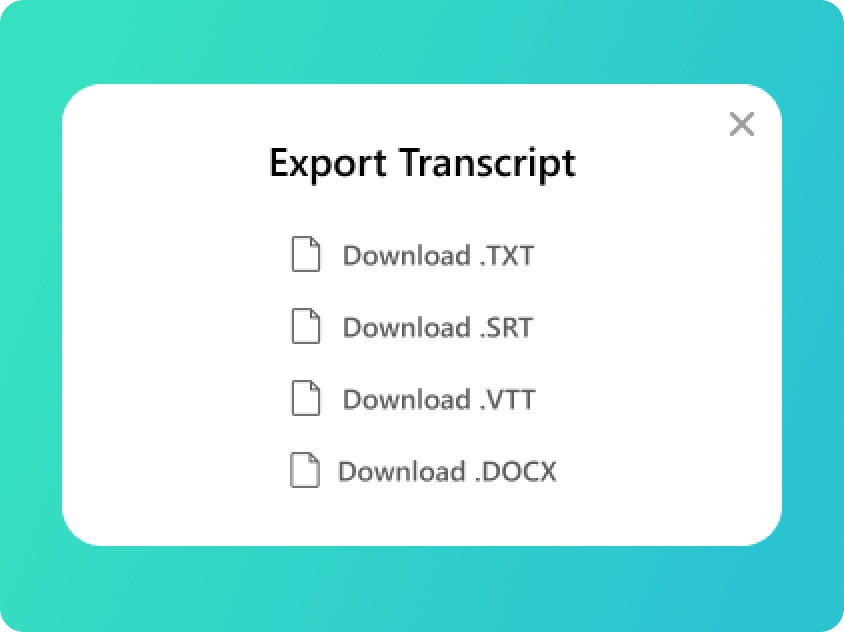
Convert M4A to TXT
You will get your transcript in minutes. Check the text and export to TXT file or SRT, VTT, DOCX if you need.
Upload Your M4A
Upload or drag and drop your M4A files; we also support audio in MP3/WAV/AAC format.
Select Audio Language
We will automatically detect your audio language. You can also manually select from 100 supported languages for better accuracy.
Convert M4A to TXT
You will get your transcript in minutes. Check the text and export to TXT file or SRT, VTT, DOCX if you need.
Lightning-Fast M4A to TXT Converter Online
-
Optimized for Mobile Recordings
M4A is the standard for iPhone voice memos and mobile captures. Our M4A to TXT converter is specifically engineered to parse these compressed files with high accuracy. Whether you’ve recorded a quick thought or a long interview, you can convert M4A to TXT and turn your mobile audio into professional documents instantly.
-
Rapid M4A to TXT Online Processing
Time is of the essence for content creators. Our M4A to TXT online platform leverages lightweight AI models to deliver results faster than traditional tools. By choosing our M4A to TXT converter online, you ensure that your M4A to TXT file is ready for editing or publishing within seconds, not minutes.
-
Flexible Export to SRT, VTT, and DOCX
We are more than a basic M4A to TXT file converter. Once your audio is transcribed, you can choose to download your file as a clean M4A to TXT document or opt for specialized formats like SRT, VTT, and DOCX. This flexibility makes it the perfect tool for podcasters who need both show notes and captions.
-
Secure, Private & M4A to TXT Converter
Enjoy a high-end M4A to TXT converter free of charge, with no compromise on security. Every M4A to TXT file you upload is handled with strict end-to-end encryption. We ensure your personal voice recordings stay private by deleting them from our servers immediately after you convert M4A to TXT.
Transcript Your Audio into Multiple Formats
-
TXT (Plain Text)
The ultimate versatile format. TXT files provide clean, unformatted text that is perfect for quick reading, copy-pasting into emails, or archiving raw notes without any compatibility issues.
-
SRT (SubRip Subtitle)
The industry standard for subtitles. SRT files include precise timecodes, making them the go-to choice for adding captions to social media videos, YouTube, and professional video editing software.
-
VTT (WebVTT)
Optimized for the modern web. VTT is the preferred format for HTML5 video players and web-based media, offering advanced features for displaying captions and subtitles across websites and online platforms.
-
DOCX (Microsoft Word)
Built for professional editing. Export to DOCX when you need to further polish, format, or highlight your transcripts. It’s ideal for formal meeting minutes, academic essays, and detailed interview reports.
Frequently Asked Questions about WAV to TXT
-
How to convert M4A to TXT for free with high accuracy?
The best way to get precise results is using our M4A to TXT converter free tool. Since M4A files often use the AAC codec, our AI is specifically tuned to decode these recordings with maximum clarity. Simply upload your audio to our M4A to TXT online platform, and we will convert M4A to TXT with impressive precision in just a few clicks.
-
Can I use this M4A to TXT converter for iPhone voice memos?
Absolutely. M4A is the standard format for Apple devices, and our M4A to TXT converter is fully compatible with any voice memo or mobile recording. Whether you are a journalist or a student, our M4A to TXT online service makes it incredibly easy to convert M4A to TXT so you can start editing your notes immediately.
-
Does the M4A to TXT file converter support SRT or DOCX exports?
Yes, our M4A to TXT converter is designed for real-world needs. Once the transcription is finished, you aren't limited to a simple M4A to TXT file. You can choose to download your content as an SRT or VTT file for video subtitles, or a DOCX document for professional reports and scripts.
-
Is it safe to upload my personal M4A to TXT file for transcription?
We take your privacy seriously. When you use our M4A to TXT converter online, your audio is protected by end-to-end encryption. Once you convert M4A to TXT, both your original recording and the generated M4A to TXT document are automatically deleted from our servers. It is the most secure way to convert M4A to TXT without any privacy concerns.
Rate Us Now!
Show your love by giving 5 stars!
If you like our M4A to TXT Converter, please give us 5 stars.
2.1K reviews
Last updated: 2026-03-27